Subo now checks your questions before your community sees them
Subo now reads your script and tells you what could go wrong before you open it: a question that asks for a password, an Anonymous project that asks people for their Discord username, a free-text question that should have been a rating. That is the Audit, and it is new today. It reads only your questions, never your members’ answers, and it is free on every plan.
Two features you already know got rebuilt in the same release. Drafting, where Subo writes a project from your request, and summaries of open-text answers now run on better models, with better instructions and more checks around them. More on how we chose and tested all of that below.
The Audit: a second read of your script
You’ll find it in the web app, on a project’s Script tab. Click Run audit and you get up to three groups of findings.
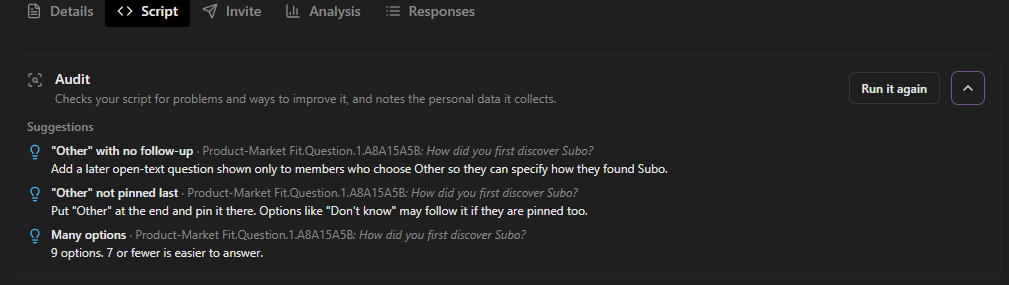 Suggestions.
Risks are critical things to fix before anyone answers:
- A question that asks for a password or another credential, like a PIN or a recovery phrase. No project should have one, and asking for one looks like phishing.
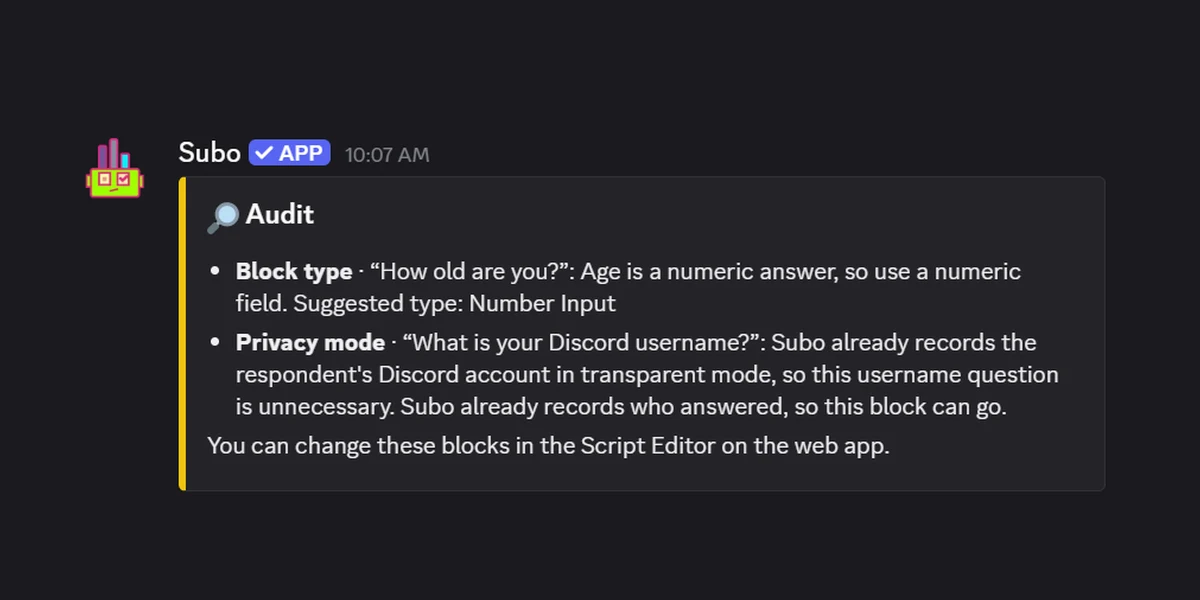
- A privacy mode that does not match the questions. A Discord project in Anonymous mode that asks for people’s Discord usernames gets a suggestion to switch to Semi-private, where Subo records who answered for you. On a project that already records who answered, the Audit tells you the username question can go.
- The wrong block type. “How many hours a week do you play?” as open text means you can’t average the answers. The Audit suggests switching to an open numeric block instead.
Personal data collected is a plain list of the questions that collect personal data, like an email or an in-game username. The Audit writes it down so you know what the project holds.
Suggestions are drawn from Subo’s survey design tips: a survey longer than ten questions, two questions in one, more than seven options, a scale longer than five points, an “Other” option with no follow-up question. Research Convos get a few extra checks (overlapping options, a missing “Prefer not to say”, jargon). As their name suggests, they are only suggestions. Please feel free to ignore if they don’t apply to your project. Or, even better, let us know if you disagree with some of them.
It also runs when you open a project
You don’t have to remember to run it. When you open a project from the web app and the Audit finds a risk, the confirmation dialog shows it first:
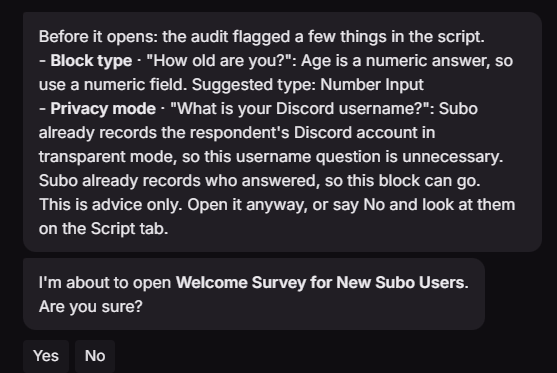 Advice only. Yes opens the project anyway.
In Discord, the bot posts the same findings after it opens a project, and the project editor keeps the latest ones in a gold box above the script every time you open it:
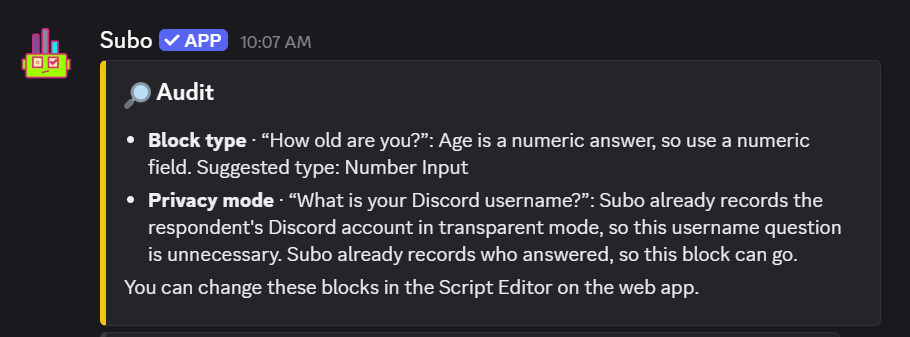
Scheduled projects get the findings added to the notice you receive when they open.
It never blocks anything. A script that doesn’t change returns the last result straight away, and the explanations are written in your language.
Drafting: rebuilt, with a plan first
You can still let Subo draft a script, in the web app or in Discord with the /draft command. What changed is underneath.
You now see a plan before anything is written
Subo replies with an outline of the project, up to three questions it needs answered (tap a suggested answer or type your own), and the language it will write in. If you like the plan, you now have the option between two models, Quick or Deep, each with its credit estimate, to Draft it. If the plan is off, Change my request takes you back.
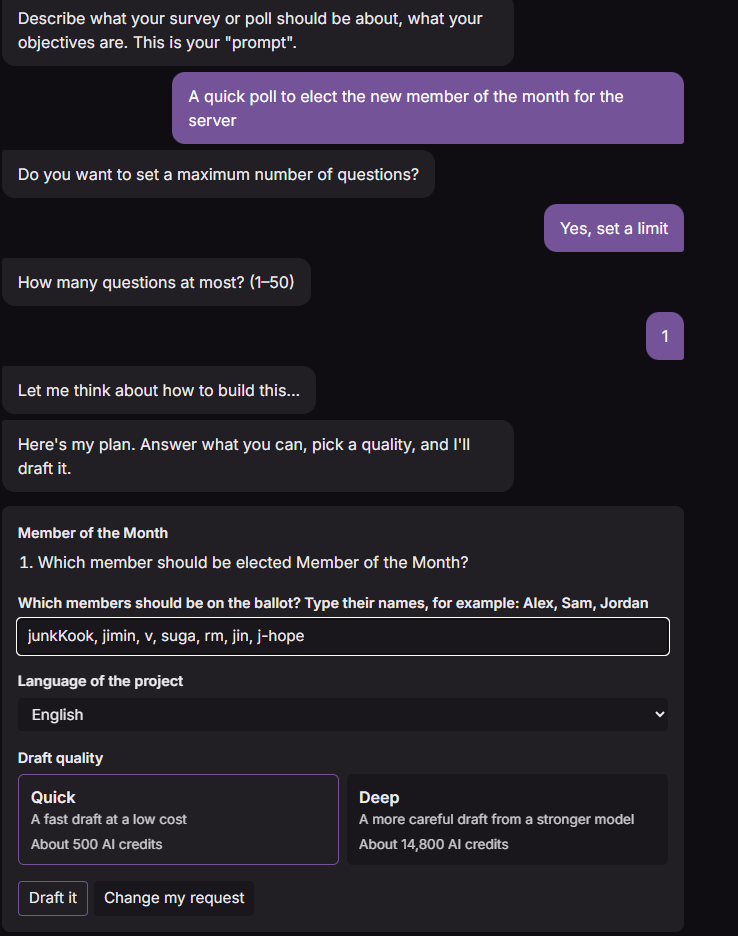 Quick or Deep, with the cost shown before you spend anything.
Quick is a fast draft at a low cost. Deep is a more careful draft from a stronger model, but costs more credits. Having two to choose from is new: until now there was one model and no choice.
If your project depends on things a model can’t know, like this season’s line-up, last week’s results or the odds on Sunday’s match, the plan asks for them in a Facts to use box. The draft uses them as written. Subo does not search the web, so anything recent goes there.
Better models, picked by testing them
We wrote 23 test requests in English, French and Spanish (polls, research Convos, knowledge quizzes, personality quizzes, prediction contests) and ran them through 13 models. Every draft was scored automatically: does it pass Subo’s own script checks, does it use the right block type for each question, does it keep to the number of questions asked for, does it follow up an “Other” option. Quick and Deep use the two that did best in their price range. Even Quick, the lower-cost option, returned vastly superior results compared to the previous version.
As new models are released frequently, we will continue to keep an eye on the best models providing the best value for the job to do.
Real scripts, checked before you see them
The old drafter could only write four question types. Drafts now use the whole script: ratings, opinion scales, NPS, rankings, intro content, skip logic, and scoring for quizzes with outcomes (“Which house are you?”) and prediction contests.
The project then opens on the Script tab with a Check before publishing panel: Subo’s notes on what to verify (a quiz answer it wasn’t sure of, for example), plus anything it left out.
Any language
Projects can be drafted in any language, not only Subo’s available interface languages. Pick it on the plan, or just ask for “a poll in Tagalog”. The plan and Subo’s notes are written in your own language, which can be different from that of the community. Subo’s buttons and system messages stay in your community’s language.
Summaries: better counts, never by name
Turn on Text Analysis and Subo summarizes the answers to your open-text questions into themes. The summaries run on a newer model with a new prompt, and the result reads differently:
- Themes don’t overlap, and each theme’s label fits every answer in it.
- The counts are exact. The model sorts answers into themes; Subo counts them, including how many fit no theme. Before, the model estimated the numbers (and was not very good at math).
How Subo handles personal data for summaries to protect your members’ privacy:
- Members are never sent by name. Each respondent goes to the model as a code like
R-7K3QXA, different in every project. Names come back in the summary only on projects whose privacy mode shows them. - Questions that ask for personal data are off by default. Subo tries to identify them (email, phone, address, full name, birth date) and leaves them out unless you turn them back on.
- Personal data is removed before sending: if you still ask Subo to summarize text that contains personal data, Subo looks for it (emails, phone numbers, IP addresses, IBANs, card numbers and Discord ids) and redacts the data before it is sent to an external model.
You can check all of this yourself. On the Results tab, each open-text question has a What gets sent to the AI? link that shows how many answers are sent, what was removed, and a sample as the model sees it.
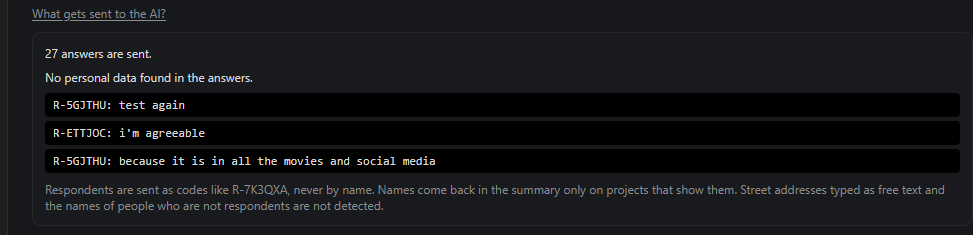
The panel also states the limit plainly: street addresses typed as free text and the names of people who are not respondents are not detected. So we don’t call this anonymization. It’s pseudonymized and redacted, with those two gaps.
Text Analysis can now be turned on or off at three levels: the community default in Settings, each project on its Details tab, and each open-text question on the Script tab. Summaries are written in your community’s language, and they spend credits as before.
Which providers run these models, and what each one keeps, is on our privacy page.
Also in this release: a tidier web app
Same look, better layout:
- The dashboard opens on your community: “Recent projects in [your community]”, with a “New Project” button and each project’s status and response count.
- A new Communities page lists every community you can reach, with search, role badges, and Add Subo to a server.
- An improved community switcher in the top bar, with your communities now grouped as Recent, You manage, Member of and Disconnected. Open the switcher with Ctrl K (⌘K on a Mac) to save time.
- The Script editor now uses the full window. Drag to resize the block list, the editor and the preview; Subo remembers the layout. The block list can collapse to a slim rail, and the preview can be hidden/ restored.
- Community icons that broke after a Discord icon change now refresh each time you log in.
Run the Audit on your next project before you open it, and tell us what it caught. Come tell us in the Support Server →
Subo is the survey and poll bot for Discord communities: Convos and polls your members answer right in Discord or on the web, with XP rewards, analytics and an API.
Frequently asked questions
What does the Audit check?
The script of a project: its questions, answer options, privacy mode and delivery settings. It flags risks (a question that asks for a password, an Anonymous project that asks for Discord usernames, an open-text question that should be a rating or a number), lists the personal data the project collects, and suggests up to three improvements from Subo's survey design tips.
Does the Audit read my members' answers?
No. It reads only the script. It never reads responses.
Does the Audit stop a project from opening?
No. It is advice only. If it finds a risk when you open a project, it tells you what it found and you can open it anyway.
How much does the Audit cost?
Nothing. It is free on every plan, Free included, and spends no credits.
What is the difference between Quick and Deep drafts?
Quick is a fast draft at a low cost. Deep is a more careful draft from a stronger model, and costs a lot more credits. Both show their estimated cost before you spend anything.
Are my members' names sent to the AI model when Subo summarizes answers?
No. Each respondent is sent as a code like R-7K3QXA. Emails, phone numbers, IP addresses, IBANs, card numbers and Discord ids are removed from answers before sending. Street addresses typed as free text and the names of people who are not respondents are not detected, so we do not call it anonymization.