
Optional Questions: Let Members Skip in Discord Surveys
A Convo has no Next button. Each question waits for an answer before the next one arrives, so until now every question was effectively mandatory. A member who had nothing to say about the event they missed, or no file to attach, had two choices: make something up or stop answering.
Now any question can be optional. An optional question shows a Skip button, on the web and in Discord, and a skipped question is saved with no answer.
Turning it on
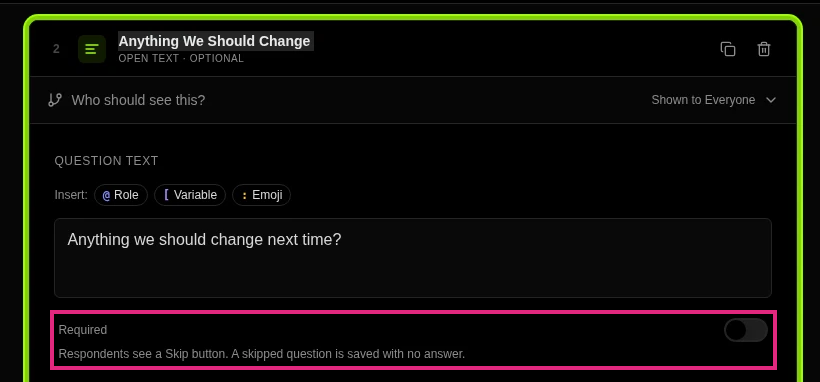
In the Script Editor, every block that takes an answer now has a Required switch in its settings: open text, number, date, choice, scales and ranking. It is on by default, and every question you built before this change stays required.
Turn it off and the help text reads “Respondents see a Skip button. A skipped question is saved with no answer.” The block’s card adds ”· Optional” after its type, so you can see at a glance which questions members can pass on.
File Upload blocks keep their own setting: set Min files to 0 to make one optional. Polls are not affected, because not voting is already how you skip a poll.
What members see
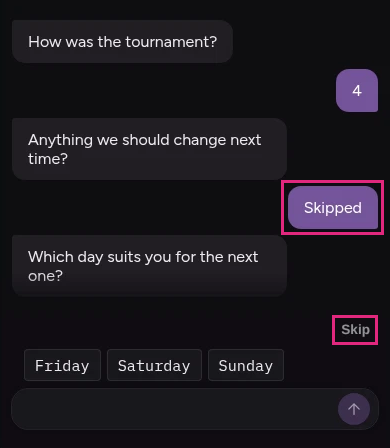
- On the web, an optional question shows a Skip button under it. Skipping posts a “Skipped” bubble, so the conversation still reads naturally.
- In Discord, the Skip button sits in the button row of a choice or scale question, or on the message of a question answered by a reply. Answering instead greys the button out. It works in threads, DMs and journey threads.
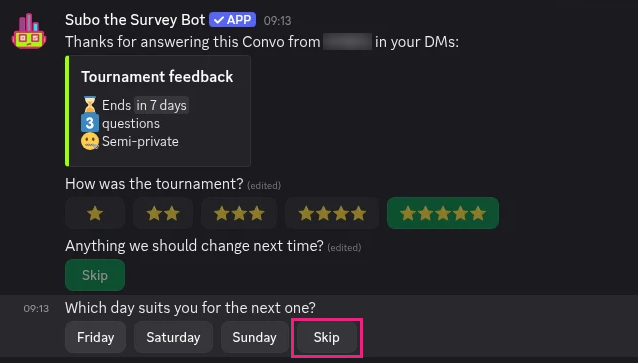
A multi-select or a ranking with a minimum can be skipped as a whole. If the member does answer, the minimum still applies.
How skips show up in your results
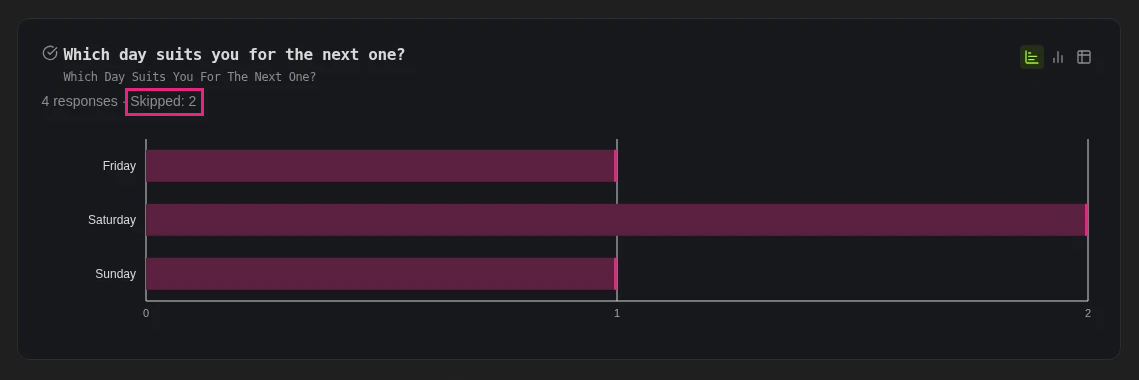
A skipped question is counted, but never as an answer:
- Analysis tab: each card says “Skipped: N” next to the response count, and percentages are worked out over the people who answered. Ten skips on a rating question do not drag its average down or shrink every bar.
- Responses tab: the cell and the response’s details say “Skipped”.
- Full Report and Discord
/results: a “Skipped: N” line under the question. - CSV and spreadsheet exports: an empty cell.
- AI summaries ignore skipped answers.
In skip logic, a skipped question counts as “not answered”, and it pipes as nothing. So “if they skipped the feedback question, thank them anyway” is one condition.
When to make a question optional
Keep the questions that decide what you do required: the application’s availability, the bug report’s steps. Make optional the ones where “nothing to add” is a real answer: a follow-up comment, a second choice, feedback on an event someone may have missed, a file they may not have. A member who can skip one question is more likely to finish the rest, and an answer they chose to give is worth more than one they were forced to invent.
For developers
The required field on blocks in the Public API now takes effect: required: false makes a question optional. It was accepted and ignored before, so check any script you send with required: false in it. Skipped answers come back with skipped: true, and the analysis gives each block a skipped_count, with skips left out of response_count and percentages.
Try it
Optional questions work on every plan, Free included. Open a Convo in the web app, select a question that should not hold anyone up, and turn off Required.
Subo the Survey Bot runs polls, quizzes and conversational surveys (Convos) inside Discord and on the web, with XP, roles and rewards for the members who answer.
Frequently asked questions
How do I make a question optional in a Discord survey?
In Subo's Script Editor, select the question block and turn off its Required switch. Respondents then see a Skip button under that question, on the web and in Discord. For a File Upload block, set Min files to 0 instead.
Are questions required by default?
Yes. Every question block starts required, and every block you built before this change stays required until you turn its switch off.
Does a skipped question count as an answer in the results?
No. Results show "Skipped: N" next to the response count, and percentages are worked out over the people who answered, so skips never dilute a chart. In exports a skipped answer is an empty cell.
Can members skip a poll?
Polls are not affected: not voting is how you skip a poll. The Required switch is for questions in a Convo.