Skip Logic for Discord Surveys: Show, Hide, and Reward Based on Answers
Nobody wants to answer questions that do not apply to them. Ask a PC player about their console settings, or a member who joined yesterday what they think has changed this year, and you get a shrug, a guess, or an abandoned survey.
Skip logic fixes that. It is a condition attached to a block that decides whether the respondent sees it, based on what they already said. Everyone starts from the same script. Subo does the routing.
It also does more than hide questions now, which is the part most people miss: the same condition system fires rewards.
Where conditions live
Open any block in the Script Editor and you will find a section near the bottom with a branch icon. What it says depends on the block:
- “Who should see this?” on question and content blocks. Collapsed, it reads Shown to Everyone until you add a condition, then Conditional.
- “When should this fire?” on action blocks, the ones that give a role, an achievement or XP. Collapsed, it reads Always fires.
Same builder underneath, two different jobs.
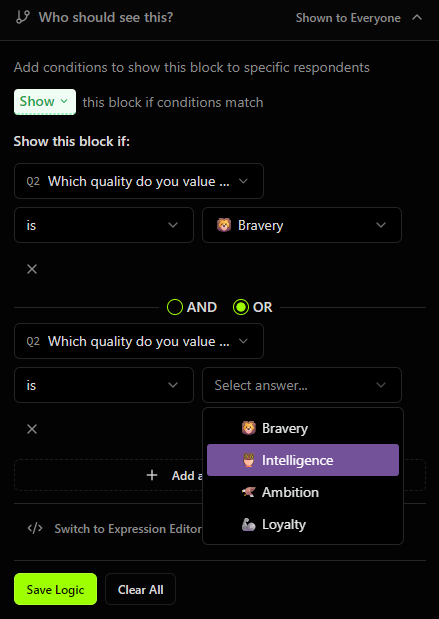
That is the Visual Editor: pick the earlier question, pick an operator, pick the answer. Add a second row and choose AND or OR to join them. The condition above shows a block to anyone who valued either Bravery or Intelligence.
Note the Show / Hide dropdown at the top. The same condition can mean “show this block when it matches” or “hide this block when it matches,” so you rarely need to invert your logic by hand.
What you can branch on
The operators you get depend on the question you point at, because a scale and a multi-select do not answer the same kinds of question.
| Question type | Operators |
|---|---|
| Single select | is, is not, excludes |
| Multi select | includes, excludes |
| Numeric | is, is not, greater than, greater or equal, less than, less or equal |
| Rating, Opinion Scale, NPS | is, is not, greater than, greater or equal, less than, less or equal |
| Ranking | top choice is, top choice is not, ranked, did not rank |
| Open text, email, Discord name | answered, not answered |
| Calculated field | is, is not, greater than, greater or equal, less than, less or equal |
Two rows in that table are new, and both come from Rating, Opinion Scale, NPS and Ranking shipping as real question types.
Rating, Opinion Scale and NPS store a number, not a reference to an option. That is what makes them comparable. The standard NPS detractor follow-up, the one every research team builds, is now a single visual condition: NPS less or equal 6. Before, admins faked a rating with a five-option choice question, and a choice question can be counted but not compared.
Ranking answers two different questions, so the builder gives it two kinds of operator in plain words. Top choice is tests what someone put first. Ranked tests whether an item appears anywhere in their order, which is the reading you actually want when the block asked for a top 3. “Did they rank our new mode at all” and “did they rank it first” are different findings, and conflating them is how you talk yourself into shipping the wrong thing.
Calculated fields are branchable too, so a value you computed from several earlier answers can drive the routing instead of a single raw answer.
Conditional rewards
Action blocks are where skip logic stops being about survey length and starts being about what the survey does.
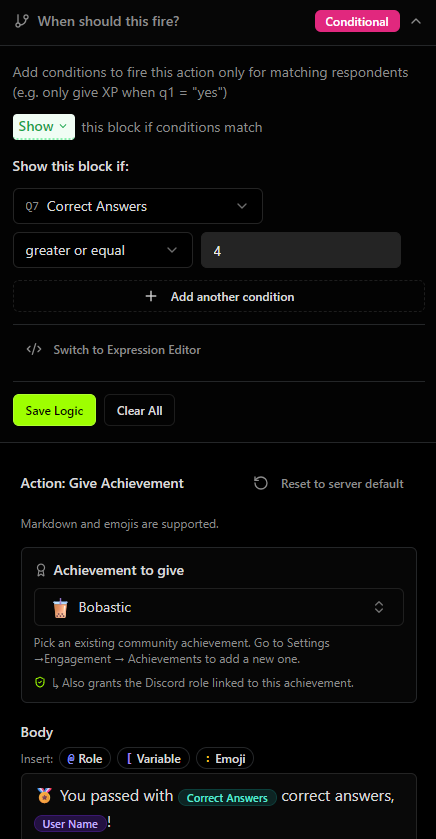
That is a quiz that hands out an achievement only to people who got at least four right. The condition points at Correct Answers, a running count of correctly answered questions, not at a specific question. Alongside it you get max_correct_answers (how many gradeable questions there were), score, max_score, and one variable per score bucket, so a sorting quiz can reward on a bucket total.
Two details in that screenshot worth stealing:
- Giving an achievement also grants the Discord role linked to it, so you configure the reward once in Settings and the survey just names it.
- The message body takes the same pickers as any other block.
@for a role mention,[for a variable,:for an emoji. “You passed with [correct_answers] correct answers, [UserName]!” reads like something a person wrote.
Gate a role behind a screening question and you have an application flow. Gate XP behind a correct answer and you have a quiz with stakes. The volunteer moderator funnel recipe does the first with two opposite conditions, one handing out a trial role and one routing to a waitlist.
The Expression Editor
The visual rows cover most of what people build. When they do not, there is a link at the bottom of the panel: Switch to Expression Editor. It is on VIP and Custom Bot.
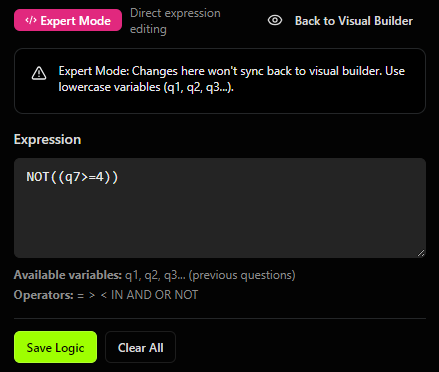
That is the same rule as the achievement above, inverted: everyone who did not get four or more correct. Questions are lowercase positional variables (q1, q7), score variables keep their names (correct_answers), and the operators are = > < IN AND OR NOT.
Reach for it when you need nesting the visual rows cannot express, typically a mix of AND and OR in one condition, or a NOT wrapped around a group.
One warning the editor gives you, and it means it: Expert Mode is one-way. Changes there do not sync back to the visual builder. Build as much as you can visually, switch over, then finish in text.
Three that work
Onboarding, by tenure. “How long have you been here?” routes three ways: under a week gets asked what brought them in, one to six months gets asked what they enjoy, six months and up gets asked what has changed. Three different surveys, one script, and three segments you can compare afterward.
The detractor follow-up. NPS less or equal 6 shows an open-text block asking what went wrong. Promoters skip it and get asked what to tell their friends instead. This is the highest-value four minutes of setup in this entire post.
The “Other” catch. Someone picks Other on how they found you. A conditional open-text block asks them to say more. Without it, “Other: 34” is a number you can do nothing with.
Things that go wrong
Branching more than two levels deep. Every branch is a path you have to test. Three levels is where people lose track of what a given respondent actually sees.
Universal questions trapped inside a branch. If everyone needs to answer it, keep it out of the conditional section entirely. Put it at the start or the end.
Ambiguous trigger questions. If respondents cannot tell what they are picking, everything downstream inherits the confusion, and your segments are noise.
Shipping untested. Run test mode and walk every path before you open it. A survey that skips a question someone should have answered is worse than no survey, because you will not know the data is missing until you analyze it.
Branching for the sake of it. Skip logic pays when different people genuinely need different questions. It costs when you use it to show off.
A note on polls
Polls are a single question, so there is nothing to branch questions on, and the “Who should see this?” section does not appear. Action blocks after a poll do take a condition, though, so you can give a role or XP based on how someone voted. Vote in the pick-a-side poll, get the side’s role.
Getting started
The Visual Editor is on every plan, Free included. The Expression Editor is on VIP and Custom Bot. See all plans.
Two recipes show the whole pattern working: the volunteer moderator funnel, where two opposite conditions decide who gets a trial role and who gets the waitlist, and the welcome quiz, which routes new members by region and hands out the matching roles. The template library ships scripts with the logic already wired, and content blocks are what you put on the end of a branch when you want to say something rather than ask something.
Add Subo to your Discord server and build one.

Frequently asked questions
What is skip logic in a Discord survey?
Skip logic is a condition attached to a block that decides whether the respondent sees it. If someone answers "PC" to a platform question, they get the PC follow-ups and never see the console ones. Everyone starts from the same script and Subo does the routing.
Is skip logic free in Subo?
Yes. The Visual Editor, where you pick a question, an operator and an answer from menus, is on every plan including Free. The Expression Editor, where you write the condition as text, is on VIP and Custom Bot.
Can skip logic give someone a role or XP based on their answers?
Yes. Action blocks have their own condition, labeled "When should this fire?", so a Give Role, Give Achievement or Give XP action can be gated on any earlier answer or on a score. A quiz can hand out an achievement only to respondents who got four or more correct.
Does skip logic work with rating and NPS questions?
Yes. Rating, Opinion Scale and NPS answers are stored as numbers, so they take numeric operators. The standard NPS detractor follow-up is a condition of "less or equal 6" on the NPS block.
Does skip logic work in Discord polls?
Partly. A poll is a single question, so there is nothing to branch questions on, and the "Who should see this?" section is hidden. But action blocks after a poll do take a condition, so you can give a role or XP based on how someone voted.
What is the difference between the Visual Editor and the Expression Editor?
The Visual Editor builds conditions from dropdowns and joins them with AND or OR. The Expression Editor lets you type the condition directly using lowercase variables like q1 and q7, with the operators = > < IN AND OR NOT, which is how you build nesting the visual rows cannot express. Switching to Expert Mode is one-way: edits there do not sync back to the visual builder.