Ranking Questions in Discord: Let Your Community Rank What You Build Next
Ask a community what you should build next and the answer arrives useless in a very specific way.
You list nine features, members check the ones they want, and seven of them clear 60%. Everything is popular. Nothing is first. You still have to pick, so you pick, and the survey did not help.
That is not a badly written question. It is the wrong instrument. A multi-select measures approval, and approval is cheap: nobody pays anything to check a box. Ranking questions cost the respondent something, which is exactly why the answers are worth more.
Subo now has them, and they run inside Discord.
Members tap, in order
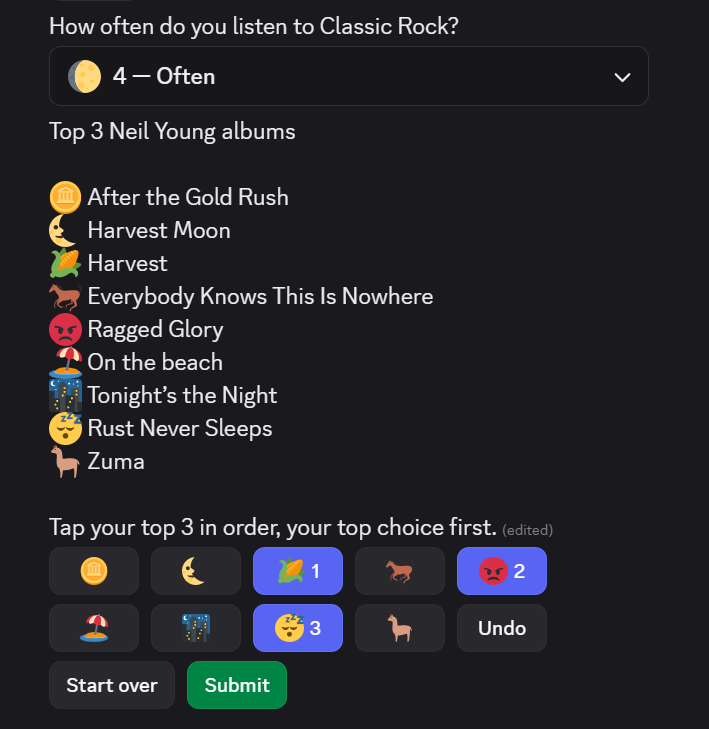
There is no dragging. A member taps the item they want first and it takes rank 1, taps the next for rank 2, and the ranks appear on the buttons as they go. Undo, Start over and Submit sit underneath, and Submit goes live when the ranking is complete. The image at the top of this post is one in progress: a top 3 of seven Bob Dylan albums, three of them tapped and badged, inside a Discord channel.
Tapping is what makes this work at all in a chat client, and it is what makes it work on a phone, where drag-and-drop reordering is miserable in any tool. The web Convo runs the same interaction rather than a different one, so a survey you send to Discord and to a web link behaves identically in both places.
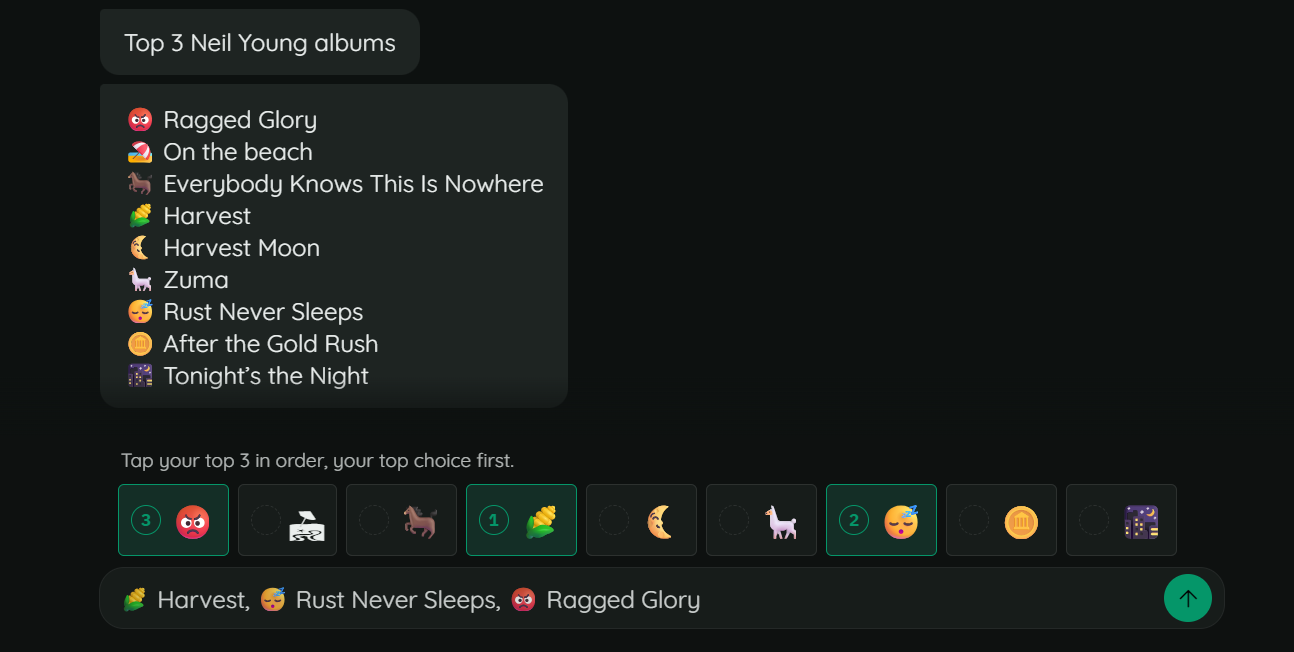
Those empty circles do the teaching: these are unranked, tap one and it gets a number.
If your items have long names, switch the answer style to emoji mode: the full list moves into a message above and the buttons become the emoji alone, carrying the rank number.
The mechanics of the whole scale family, including how rating and opinion scales work, are in the launch post. This post is about what to do with a ranking once you have one.
Three questions worth ranking
The roadmap vote. This is the obvious one and still the one most communities get wrong by asking it as a multi-select. Ask for a top 3 of your next eight candidates and you learn the order, not the enthusiasm. The follow-up matters as much as the question: put an open text block after it asking why their number one is their number one, and the answers explain the ranking in a way no chart will.
The tournament map pool. Eight maps, rank your top 5, and the pool builds itself from the average ranks. This is a case where the ranking is the decision rather than an input to it, which changes how you announce the result. Publish the table.
The merch drop. Six designs, rank your top 3. A multi-select here tells you that people like designs, which you knew. A ranking tells you which two to print, and the gap between second and third tells you whether to print two or three.
The through-line: reach for a ranking when the outcome is a decision about order or scarcity. Reach for a multi-select when you genuinely want to know everything someone would take.
Setting one up
Items are a normal option list, so emoji, reordering and randomization behave exactly as they do on a choice question. Two controls belong to ranking alone.
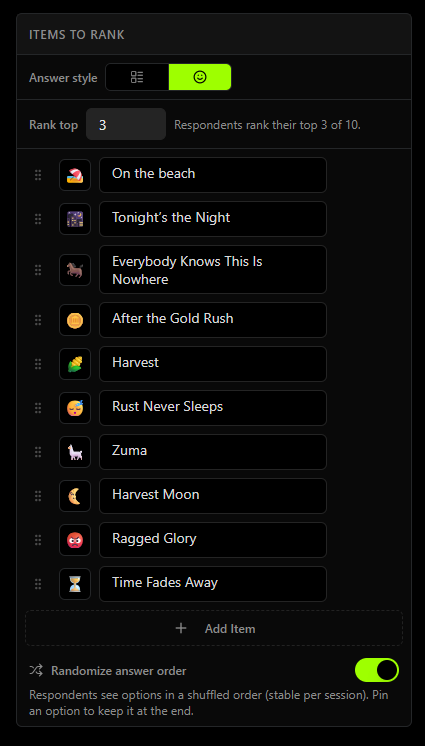
Rank top N. Asking for a top 3 out of 10 is first-class, not a workaround. It is also the better question most of the time: the difference between someone’s 8th and 9th choice is noise, and asking them to produce it costs you completion rate to buy data you should not trust.
The 7-item warning. Above seven items Subo tells you the list is getting long, and it puts that warning directly above the Rank top N control that fixes it. The hard cap is 20 on Discord, which is what fits in a message, and there is no “switch to the web version” escape for a 21st item, because a 21-item ranking is a bad instrument on any surface.
Randomization is on by default, and it matters more here than on any other question type. Whichever item sits at the top of the list gets tapped first by someone who is skimming, and that bias goes straight into the average rank you are about to make a decision with. The two Neil Young screenshots above are the same question on two surfaces, and the items are in a different order in each, which is randomization doing its job. You can pin an option to keep it at the end when it needs to stay there, like a “none of these” item.
One rule is not configurable: a respondent submits a complete ranking, or the complete top N, or nothing at all. Half-rankings would make responses incomparable and the average rank meaningless, so they do not exist.
Reading the results
Every ranking block gets its own results card, in two views. The table view gives you the numbers:
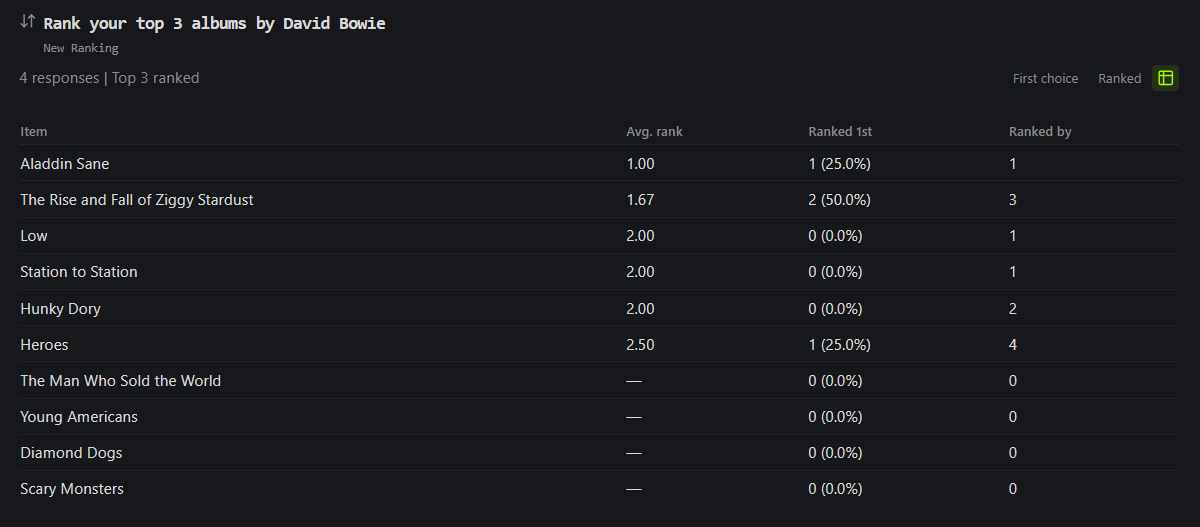
Three figures per item, and they answer different questions:
- Average rank is the mean position the item was given. Lower is better, and an item that most people put first sits near 1.0.
- Ranked 1st is how many people made it their top choice. This is the number to lead with when you announce a result, because it is the one members understand without explanation.
- Ranked by is how many people ranked the item at all, and it is what stops you misreading the first column. An item ranked by three people with an average of 1.3 is a niche favorite. An item ranked by forty people with an average of 2.4 is your priority.
The other view draws bars from first-choice picks rather than from average rank, which is deliberate: average rank is the one metric here where lower is better, and a bar chart cannot express that without teaching the reader to read it backwards. You can see that view in the launch post.
Items nobody ranked are shown, not hidden. When you ask for a top 3 of 10, seven items go unranked by each respondent, and the ones that end up unranked by almost everybody are a finding. That is your answer about what to cut.
You can also read one member’s answer on its own, in the Responses tab, rendered as a numbered list with the items’ own emoji:
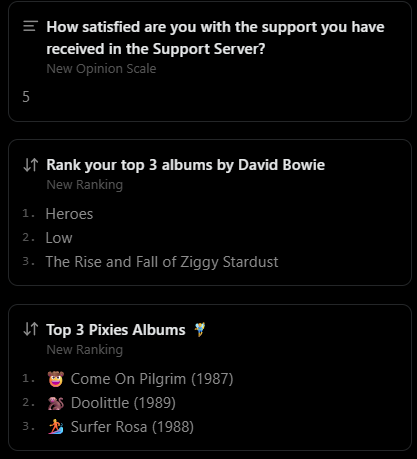
That matters more than it sounds. Aggregate ranks tell you what the community wants; individual rankings tell you whether two groups want different things, which is the thing an average is built to hide.
Downloads carry the raw positions: one column per item, holding that item’s rank and blank where the respondent did not rank it. So anything the built-in card does not compute, a spreadsheet can.
Branching on a ranking
Skip logic reads rankings two ways, and both are named in plain words in the condition builder.
Top choice is fires on what someone put first. Use it to ask a targeted follow-up: someone whose number one is “mod support” gets a different question than someone whose number one is “ranked play.”
Ranked fires when an item appears anywhere in their order. This is the one you want after a top 3, because “did this person care about it at all” is the meaningful signal when seven items went unranked by everyone.
Start from a template
Rank Your Favorites is the fastest way to see one working: a top 3 of 6 with items shuffled per respondent, and a follow-up that names the respondent’s own number one back to them. It is built around favorite game genres, so it is swappable for anything your community argues about.
For the roadmap version, Feature Roadmap Vote asks the priority question with a follow-up on urgency, and Feature Prioritization takes a different route to the same decision using MoSCoW levels, which is the better instrument when your items are release-scope commitments rather than wishes. More of this shape lives in get things done.
Ranking is a survey question type, so /poll is unchanged.
Frequently asked questions
How do I add a ranking question to a Discord survey?
Add a Ranking block in the Script Editor and write your items as a normal option list, with emoji if you want them. Set Rank top N if you only want part of the list ordered. Members answer by tapping items in order inside Discord or in a web Convo, so there is nothing to configure for the interaction itself.
Should I use a ranking or a multi-select?
Use a multi-select when you want to know what people would take if they could have everything, and a ranking when you need to know what to do first. A multi-select lets every item be popular at once, which is why nine options can all clear 60% and leave you no wiser. A ranking forces a trade-off: every item someone puts first is an item they did not put first.
How many items can a ranking question have?
Between 2 and 20. Subo shows a warning above 7, because long ranking lists produce worse data, and the warning sits directly above the Rank top N control that fixes it. On Discord the cap is 20 items, which is what fits in a message.
What does average rank mean, and why is lower better?
Average rank is the mean position an item was given, so an item ranked first by most people scores near 1.0 and lower is better. It is computed only over the respondents who actually ranked that item, which is why you read it next to the ranked count: an item ranked by three people with an average of 1.3 is a niche favorite, not a community priority.
Can members rank only some of the items?
Yes, with Rank top N: ask for a top 3 out of 10 and members order three items. What they cannot do is submit half an answer. A respondent submits a complete ranking, or the complete top N, or skips the question if you made it optional, which is what keeps every response comparable.
What does a ranking look like in the export?
One column per item, holding that item's rank for that respondent and left blank when they did not rank it. That is the Qualtrics convention, and it means a spreadsheet can compute anything you want from the raw positions.
Can I run a ranking poll with /poll?
No. Ranking is a survey question type, so /poll is unchanged.