Discord Rating Scales, NPS and Ranking: Ask It in the Chat, Read It as a Score
Four new question types shipped on August 13: Rating, Opinion Scale, NPS and Ranking. It is the biggest question-type expansion since Subo launched, and it lands everywhere at once: the Script Editor, Discord, web Convos, the Public API, reports and downloads. All four are on every plan, free included.
Two things make them worth more than a changelog line. The answer is stored as a number, so a question comes back as a score rather than a tally. And they are answered inside Discord, where a rating scale is normally a web page you have to send people to.
Why a number changes the report
Before this release, admins faked a rating with a five-option choice question. “1 star, 2 stars, 3 stars, 4 stars, 5 stars” as options, and the survey worked fine. The report did not.
An option is an identifier. Subo could count how many people picked each one and draw five bars, and that was the end of it. Nothing could average an option, because the average of five identifiers is not a number.
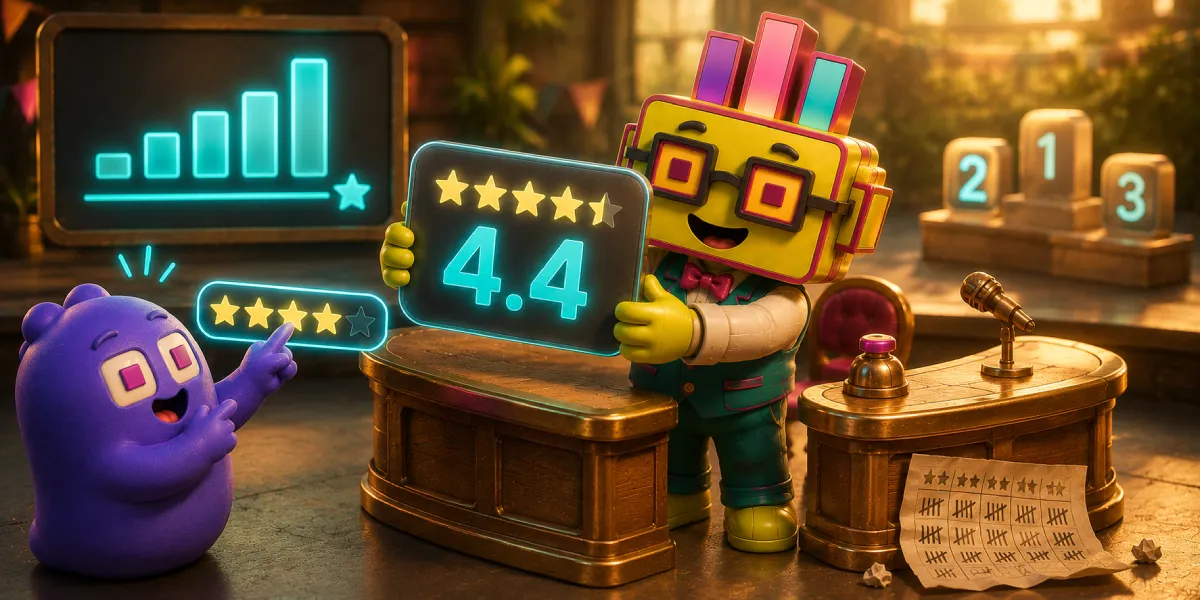
Every one of the four new types stores the integer the respondent picked. So an average, a distribution, a median and a condition like “score of 6 or less” all work with nothing configured. A question comes back as 4.4 out of 5, and the difference between a chart of five bars and an actual score is the whole point of the release.
The second thing worth saying plainly: these run on Discord. A rating scale is a web page almost everywhere else. Subo’s is a row of buttons a member taps in the channel or the DM they were already in, and that includes the ranking, which most tools build as drag-and-drop and therefore cannot put on a phone, let alone in a chat client.
Rating: intensity on one dimension
Pick 2 to 10 points (always starting at 1) and pick how they are drawn: stars, plain numbers, or an emoji set.
Emoji is the one to reach for first. A five-point scale in a gaming community should not be five stars borrowed from a hotel review form, so the emoji sets ship as presets, satisfaction faces, fire, thumbs and priority dots, and every point can be swapped for any emoji including your community’s own custom ones. Presets redraw for the point count instead of stretching: a 4-point priority scale drops a color rather than inventing a half-step.
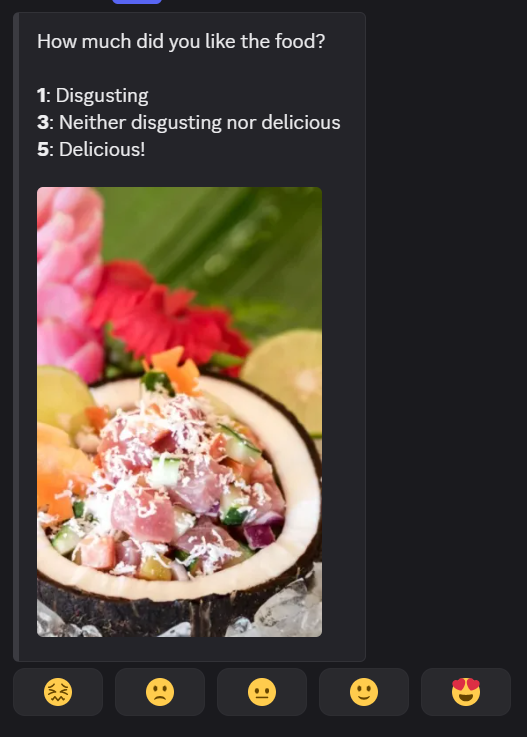
Here is the other side of it, the block being built with the live preview beside it:
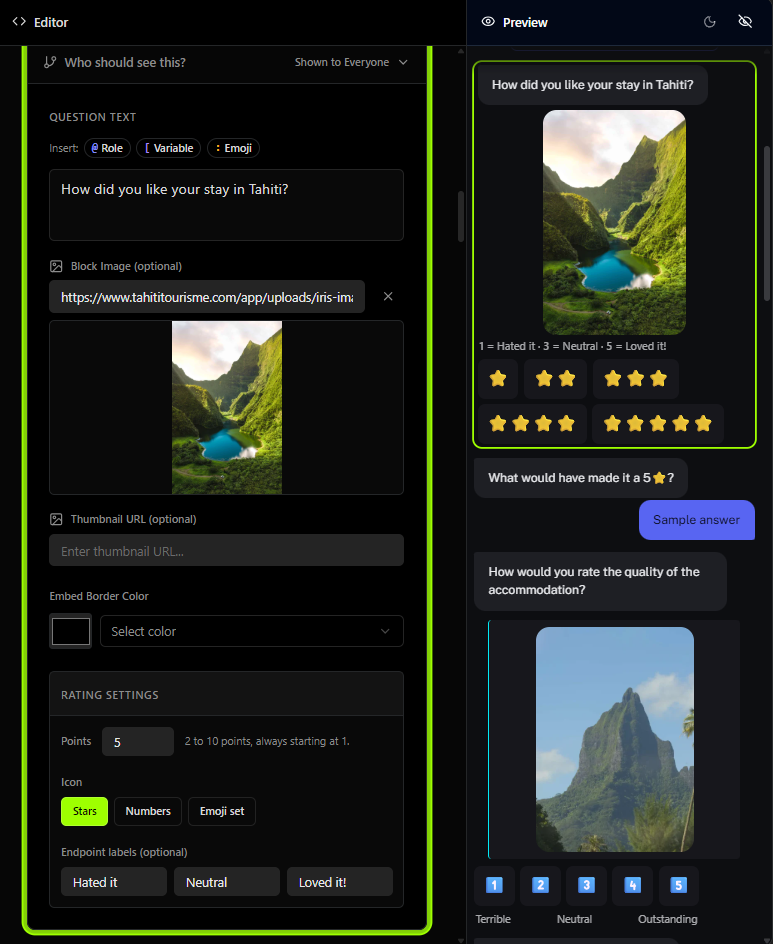
Two details in that shot. The endpoint labels are the words at each end, and on an odd point count you can name the middle too. And in the preview the anchors are rendered as a legend above the buttons rather than as a left/right pair, because the row of stars has wrapped onto two lines and a left/right pair describes nothing once that happens. On the web, Subo measures the buttons it actually drew and moves the anchors when they wrap.
Opinion Scale: an attitude between two named ends
Two to eleven points, starting at 0 or 1, and two ways to label it. The builder makes you pick one, because labeling every point already names the ends.
A word at each end. “Way too slow” and “Way too fast”, with an optional middle label on odd point counts. This is the classic semantic differential, and the builder says so.
A word on every point. This is Likert. Five presets ship translated: agreement, satisfaction, likelihood, importance and frequency. One click writes the words and a glyph onto every point.
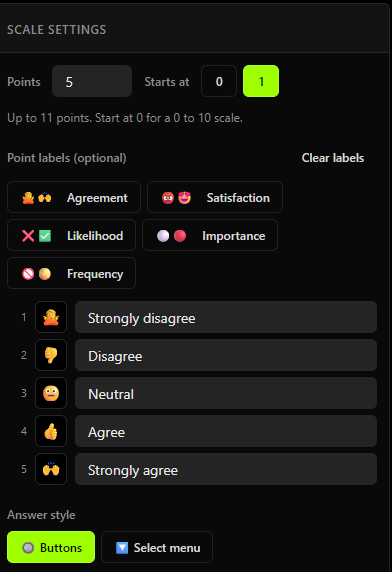
Likert is a preset of the Opinion Scale, not a question type of its own. It writes labels; the stored answer is still the point number, which is why an agreement item can be averaged and read with a >= 4 condition like anything else. For how to use one well, including what replaces a matrix question, see Likert scales in Discord.
The Buttons / Select menu toggle at the bottom of that panel matters from about six labeled points up, where a button row starts to wrap. Above that a dropdown reads better. It is a choice about the widget, not about the scale.
For communities that do not run in English, one nuance is worth knowing: preset words are authored content, not interface chrome. Applying the satisfaction preset in a French community writes French labels, and French is exactly what the respondent then reads.
NPS: locked, and that is the feature
Nothing about the NPS block is editable. It arrives with the standard question written, locked to 0 to 10, with the standard anchors translated into every language Subo speaks.
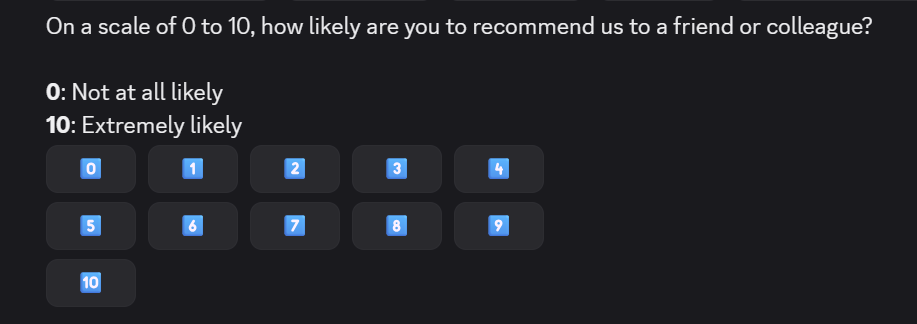
A Net Promoter Score you can edit is a number you cannot compare with anyone else’s, which is why an admin who wants a different range wants an Opinion Scale instead. The anchors go one step further: they are never stored, only rendered, so every respondent reads them in their own language and nobody can break the benchmark by editing them.
Subo gives you the question, the distribution and the average. It does not roll the answers up into promoters, passives and detractors for you. If you want the detractor conversation, the useful move is a follow-up gated on <= 6 with skip logic, which works because the answer is a number.
Ranking: tap in order, no dragging
Items are a normal option list, so emoji, reordering and randomization all behave the way they do on a choice question. Two controls belong to ranking alone: Rank top N, which asks for “your top 3 of 10” instead of the whole list, and a warning above 7 items that sits directly above the top-N control that fixes it. Long ranking lists produce bad data.
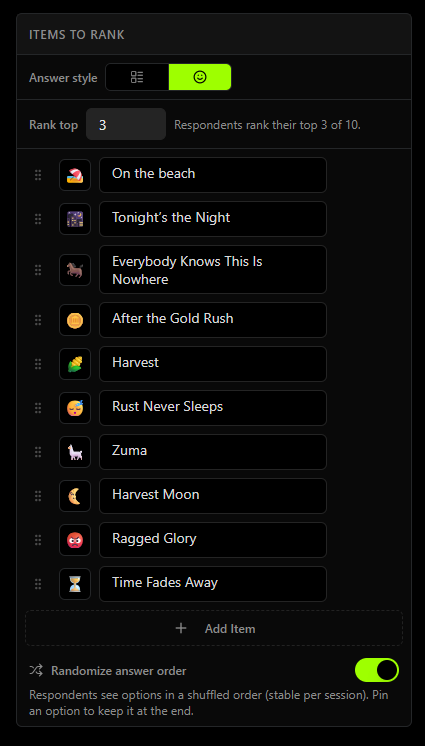
Item randomization is on by default here, and it matters more on a ranking than anywhere else: whichever item sits first gets tapped first, and that bias lands in the average rank the report shows.
On Discord, long item names go into a list above the buttons and the buttons become the emoji alone, with the rank number in the label slot:
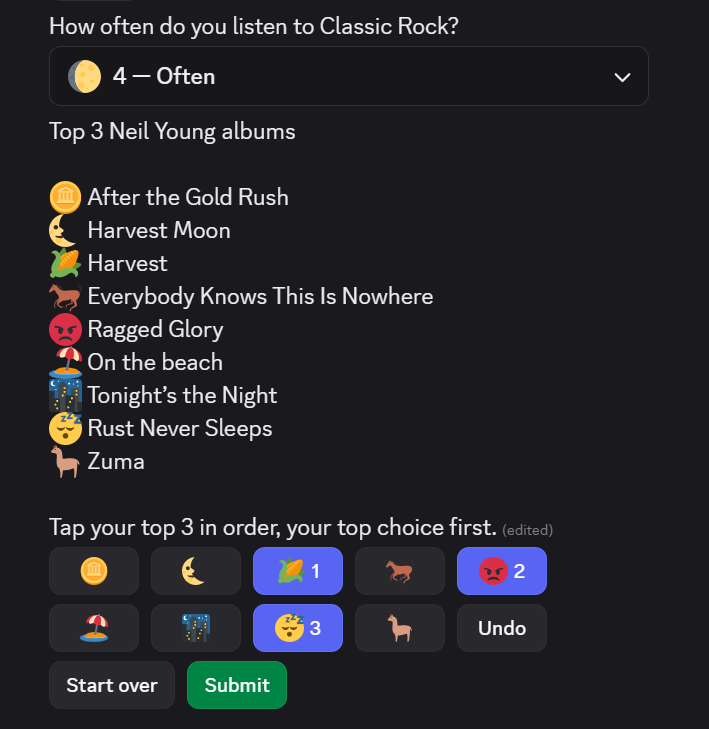
That frame carries a bonus. The question above the ranking is a labeled frequency scale in select-menu mode, closed on the answer “4 - Often”, so you can see the dropdown widget and the labeled-points-with-glyphs idea sitting next to a ranking.
The web Convo runs the same interaction rather than a different one, so the same survey behaves identically whether you send it to Discord or to a web link.
A respondent submits a complete ranking, or the complete top N, or skips the question if it is optional. There is no half-ranking, and that is what keeps every response comparable. For what to do with one once you have it, from roadmap votes to reading the average rank, see ranking questions in Discord. A Discord ranking is capped at 20 items, because that is what fits in a message, and there is no “switch to web” escape hatch for a 21st, because a 21-item ranking is a bad instrument on any surface.
What comes back
There is one rule behind every number in this release, and it is worth stating because it explains the reports:
- Built-in reports are read by a person, so they show the readable form: the Likert word, the star, the emoji, next to the number.
- Downloads are read by a tool, so xlsx and CSV carry the bare number, always, even when the point has a label or an emoji.
- Calculations are always the number, everywhere.
Rating, Opinion Scale and NPS each get an average and a distribution.
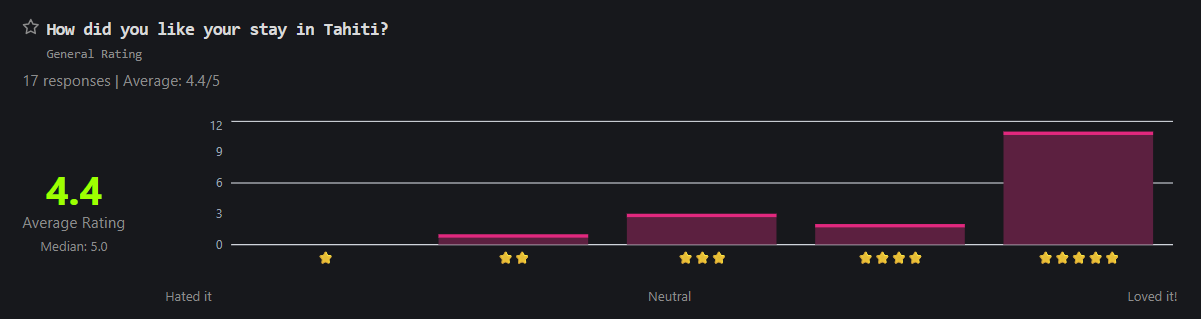
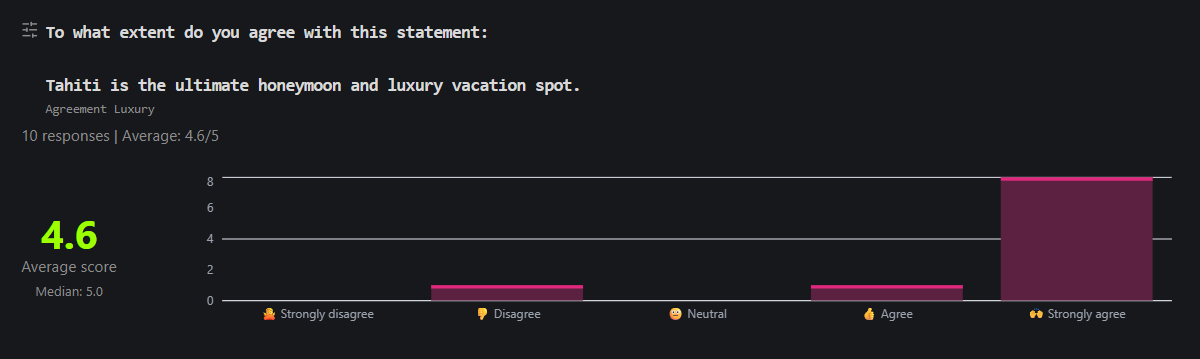
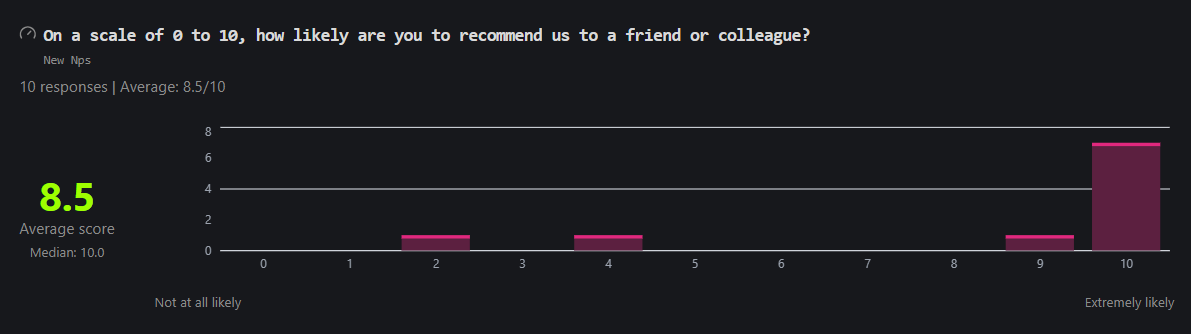
Ranking needs a different card, because the number that matters is an average rank and lower is better, which a bar chart cannot say. So the bars are drawn from first-choice picks and the average rank is printed beside them:
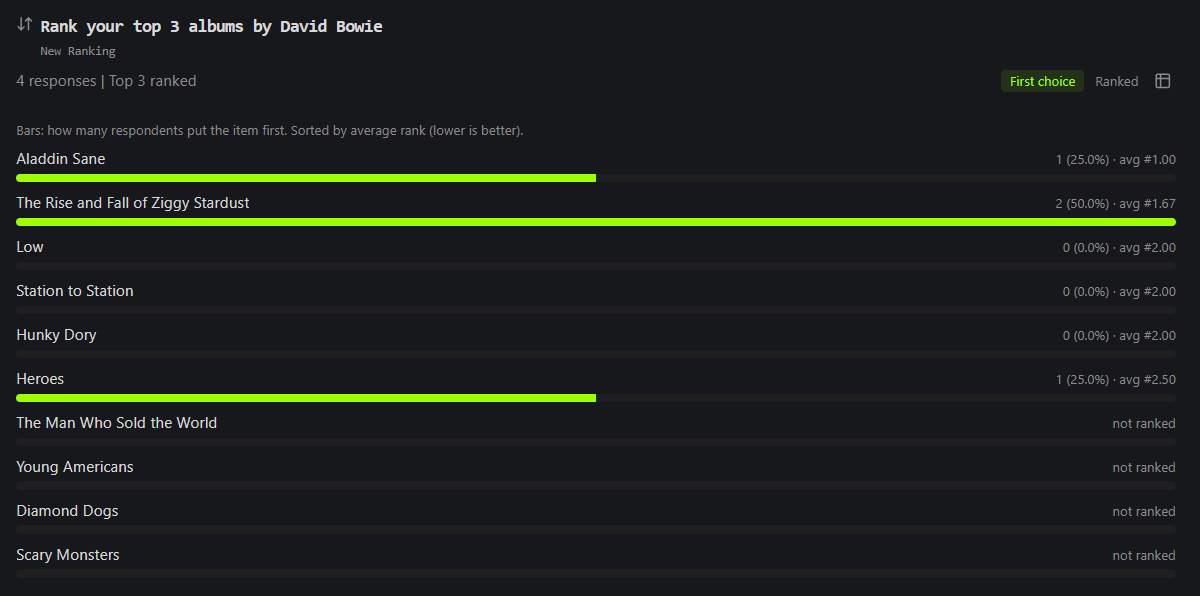
Three things in that card are the release in miniature. It states in the product’s own words that lower average rank is better. It shows unranked albums as a finding rather than hiding them. And every figure on it exists because the answer was stored as a number.
All of it flows to the web Results tab, the Responses tab, the xlsx and Sheets exports, the Discord /results embeds and the Full Report. Ranking downloads get one column per item holding that item’s rank, blank where the respondent did not rank it.
Where to start
The fastest thing to picture is a five-star question, and there is a template for it: How Did We Do? is a CSAT survey built on a star rating with a midpoint anchor. Its counterpart, How Easy Was It?, asks the same support experience a different way over seven labeled points in a dropdown, and the two routinely disagree, which is the interesting part.
For ranking, Rank Your Favorites is a top 3 of 6 with items shuffled per respondent and a follow-up that names the respondent’s own number one back to them. For the recommendation question, NPS + reason follow-up now uses the native NPS block and branches on the score.
If you would rather build from scratch, the four blocks are in the Script Editor palette under their own category, and each one opens with a working default. Authoring them through the Public API works too: rating, opinion_scale, nps and ranking, with the point number carried in options[].value and partial ranking set by rank_top_n.
One thing to know before you build: these are survey question types. /poll is unchanged.
Frequently asked questions
Can I add a star rating to a Discord survey?
Yes. Add a Rating block in the Script Editor, choose 2 to 10 points, and pick how they are drawn: stars, plain numbers, or an emoji set. A new Rating block opens as a 5-star question, so changing nothing gives you a working one. Respondents answer by tapping a button inside Discord or in a web Convo.
How do I build a Likert scale in Subo?
Add an Opinion Scale block and put a word on every point. Five presets ship translated: agreement, satisfaction, likelihood, importance and frequency. One click writes the words and a glyph onto every point. Labeling every point is what makes it a Likert item; the alternative shape is a word at each end only, which is a semantic differential.
Can I run an NPS survey in Discord?
Yes. The NPS block arrives with the standard question already written, locked to 0 to 10, with the standard anchors translated into every language Subo speaks. Subo reports the distribution and the average score. There is no automatic promoter, passive and detractor rollup, so use the distribution and the average, or build the segments yourself with skip logic on the number.
Can I create a matrix or grid question?
No, and there is a reason it is not missed. A grid is a layout, not a question: every row of one is a single agreement or likelihood question. In Subo you ask them as exactly that, one Opinion Scale block per statement with the same preset applied to each, which takes about as long to build. Each statement then arrives on its own, gets its own answer, and reports as its own scale. Facing twelve rows at once, respondents tend to run a straight line down one column; asked one at a time, they answer the question in front of them.
How do respondents rank items without dragging?
They tap in order. The first item they tap takes rank 1, the next takes rank 2, and so on, with Undo, Start over and Submit buttons underneath and the ranks shown on the buttons as they go. It is the same interaction on Discord and on the web, and it works on a phone, which drag-and-drop does not. A respondent submits a full ranking, or the full top N, or skips the question if it is optional.
Do rating and ranking questions work in Discord polls?
Not yet. These are survey question types, so /poll is unchanged.
Which plans include the new question types?
All of them, including free. No block type in Subo is tier-gated.