Likert Scales in Discord: Ask a Grid One Statement at a Time
A Likert grid is twelve statements stacked in a column, one agree-to-disagree scale running across the top, and a screen full of radio buttons in between. It is the shape survey courses teach and the shape every form tool ships, and it exists because a paper questionnaire had to fit on a page.
Subo does not have one. What it has instead is the Opinion Scale, a question type that asks a single statement and takes an answer on an ordered scale of 2 to 11 points, inside Discord or in a web Convo. Twelve statements is twelve of those, asked one after another.
That sounds like more work than a grid and reads like less. It is also, for most community surveys, the better instrument.
What a Likert item actually is
An Opinion Scale carries a statement and a set of ordered points. There are two ways to label those points, and putting a word on every one of them is what makes the item a Likert item.
Five presets ship translated: agreement, satisfaction, likelihood, importance and frequency. Clicking one writes the words and a glyph onto every point.
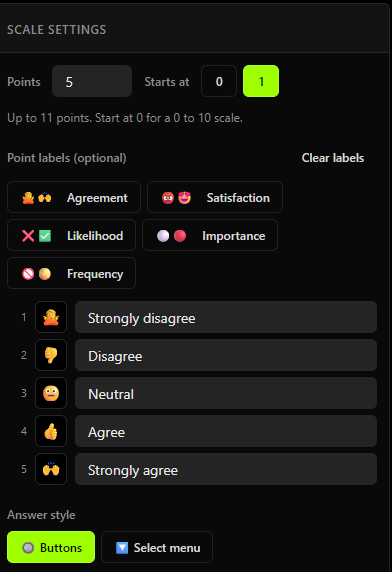
Likert is a preset, not a question type of its own. Everything underneath is the same Opinion Scale, which matters more than it sounds: whatever the labels say, the stored answer is the point number. “Strongly agree” is saved as 5, not as a reference to an option called “Strongly agree”. Averages, medians, distributions and conditions like >= 4 all work because of that one decision.
Points start at 0 or 1 and run up to 11 of them. Start at 0 when the bottom of the scale means “none” or “never” and you want the arithmetic to reflect that.
Two ways to label a scale, and the builder makes you pick
A word at each end. “Way too slow” on the left, “Way too fast” on the right, with an optional middle label that only appears on odd point counts, because an even scale has no middle to name. This is the semantic differential, and it is the right shape when the two ends are opposites rather than degrees of agreement.
A word on every point. This is Likert. Every point carries its own word, so nobody has to work out what point 4 of 7 means.
Labeling every point already names the ends, so the builder hides the anchor fields once you label a point. If the two coexisted you would end up with a scale whose left anchor said one thing and whose first point said another, and no way to know which one the respondent read.
The grid, straightened out
A grid is a layout, not a question. Every row of one is a single agreement or likelihood question that happens to have been drawn next to its neighbors. Ten statements about your onboarding, or a list of upcoming games against one shared how-likely-are-you-to-buy scale, are ten questions and a list of ten questions.
So build them as ten Opinion Scale blocks with the same preset clicked on each. In the Script Editor that is a block, a statement, one preset click, and repeat. It takes about as long as filling in the rows of a grid.
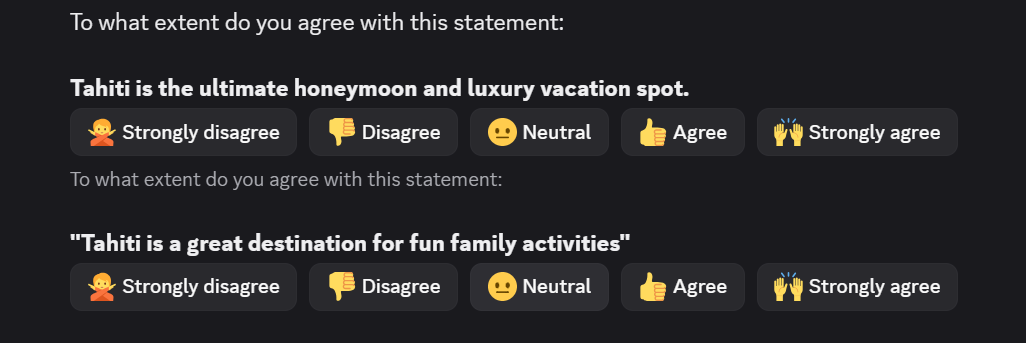
The image at the top of this post is what two of those rows look like once they are questions: two statements about the same holiday destination, arriving one after another in a Discord channel, each with the same five agreement buttons under it. That is a grid with the table taken away, and it is the whole idea. You get two things out of it that a grid cannot give you.
Each statement gets its own report. A grid reports as a wall of stacked bars that nobody reads across. Ten Opinion Scale blocks report as ten cards, each with its own average and distribution, and the one that came back at 2.9 is visible at a glance instead of being one row among ten.
Each statement gets answered on its own. This is the part that shows up in your data. Facing twelve rows at once, respondents run a straight line down one column; it is common enough to have a name, straightlining, and it is the reason grid data is treated with suspicion by people who analyze it for a living. Asked one at a time, in a conversation, someone answers the statement in front of them because it is the only thing in front of them.
There is a practical argument too. A grid is a wide table. It is cramped on a phone and impossible in a chat client, so a survey built around one cannot run where your members already are without being redesigned first. One statement at a time runs identically in Discord and on the web.
The honest trade: a grid is faster for a respondent who is going to answer it carefully, and there are studies where it is fine. If you are replicating an established battery item-for-item and the layout is part of what you are replicating, Subo is the wrong tool for that specific job. For a community survey, ten separate questions asked in a chat is a better instrument than ten rows nobody looks at.
Buttons or a dropdown
Scales are buttons by default and can be switched to a dropdown. The threshold is about six labeled points: below that the row fits and the whole scale is visible at once, above that the words get long enough that the buttons wrap onto three lines and the dropdown reads better.
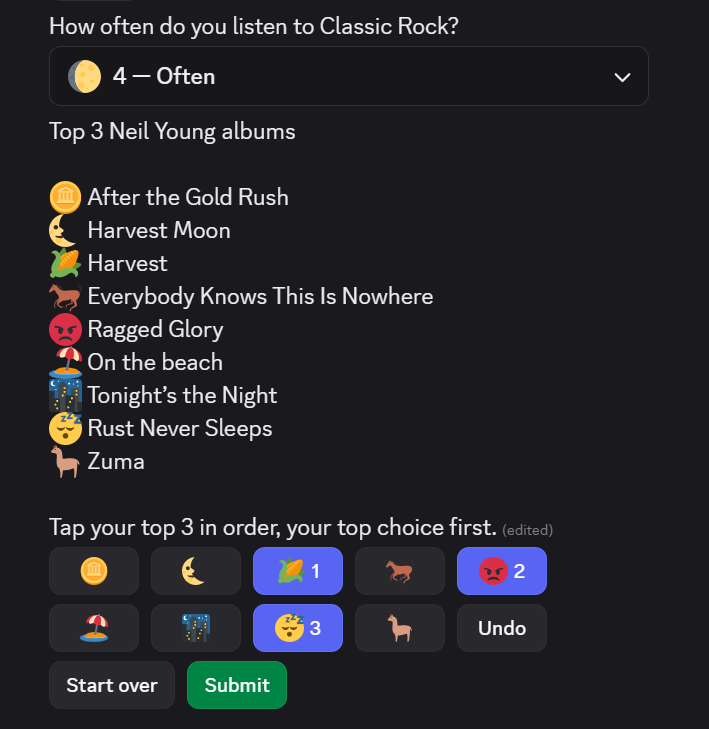
The question at the top of that shot is a labeled frequency scale in select-menu mode, closed on the answer “4 - Often”, so you can see both the widget and the labels-with-glyphs idea in one frame. Seven point scales are the usual reason to reach for it, which is why the CES template uses it.
Nothing about the data changes. It is a choice about the widget.
Reading agreement as a number
Because the answer is stored as an integer, an agreement item comes back as a score with a distribution behind it rather than a set of five counts.
This is the first statement from the top of this post, reported:
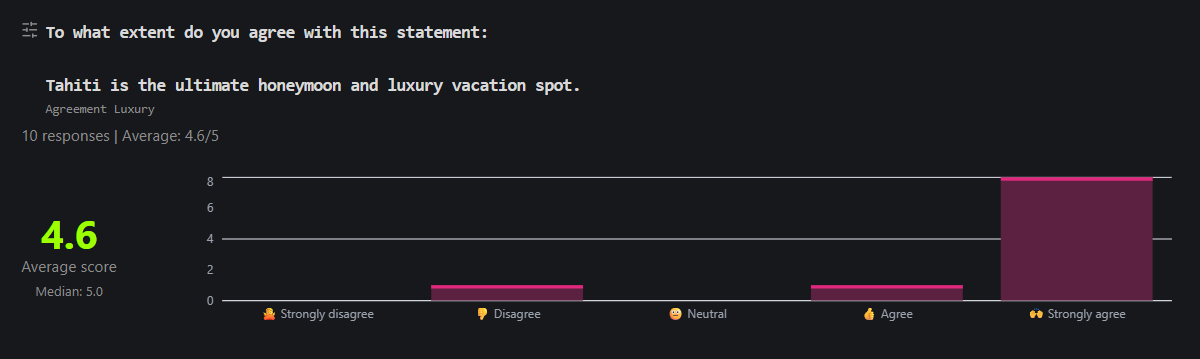
An average, a median, and a histogram whose axis carries the preset’s own words and glyphs rather than a bare 1 to 5. That is the built-in report, and it follows the rule the whole scale family follows.
- Built-in reports are read by a person, so they show the readable form: the word and the glyph, next to the number.
- Downloads are read by a tool, so xlsx and CSV carry the bare number, always.
- Calculations are always the number, everywhere.
Three things fall out of that which are worth doing deliberately.
Branch on the score. Skip logic compares a scale numerically, so a <= 2 condition after an agreement item gets you an open text follow-up from the people who disagreed and nobody else. That is a better use of a disagreement than a bar on a chart.
Average several items into one score. Three or four statements measuring the same thing are more stable than any one of them, and a calculated field averages them into a construct score on the scale’s own range. A confidence score of 3.2 out of 4 is legible in a way that “9 out of 12 points” is not, and it stays comparable when you run the survey again with a different number of items. The pre and post assessment recipe builds exactly that, and it is the closest thing to a grid this site publishes: several agreement items, one construct, one number per wave.
Keep the labels running low to high. The stored answer is the point number, so a set with “Strongly agree” sitting at point 1 inverts every average and every condition built on it, silently. If you want a negatively worded statement in the set to guard against people agreeing with everything, reverse it in the formula (5 - [Item] on a 1 to 4 scale) rather than reversing its labels. For most communities, wording every statement in the same direction avoids the problem and confuses fewer people.
On point counts: five and seven are the conventional choices, and seven earns its width when you need to see small movements between waves. For a community sample, an even number is often better. A midpoint collects the people who did not want to commit, which adds noise without telling you anything about direction, and a four point scale has no middle to hide in. The exception is a benchmark: CES is defined at seven points, so ask it at seven points.
Presets in your community’s language
The preset words are authored content, not interface chrome. Applying the satisfaction preset in a French community writes French labels into the block, and French is what the respondent then reads. It is not an English scale sitting inside a translated interface.
The NPS block takes that further, since its anchors are never stored at all, only rendered, so every respondent reads the standard wording in their own language and no admin can break the benchmark by editing it.
Where to start
How Easy Was It? is the seven point labeled scale as a working survey: the standard effort statement, delivered as a dropdown, with the reason behind the score and a category question so you can slice it. It is the fastest way to see a long Likert item behave in Discord.
A single labeled scale is often the whole job, and several templates already run one as their spine. Feature Roadmap Vote closes on a four point urgency scale, which is what separates a feature with 12 votes averaging 3.8 from one with 15 votes averaging 2.2. Suggestion Box carries a priority read on the member’s own idea, so a channel full of suggestions arrives sorted by how much they matter to the people who wrote them.
To build from scratch, the Opinion Scale sits in the Script Editor palette with the rest of the new question types, and a new block opens with a working default. Through the Public API it is opinion_scale, where the range is the block’s min and max and a label on every entry in options is the Likert mechanism. The rest of the family, including ratings, NPS and ranking, is covered in the launch post.
If what you came here to build is a form rather than a study, the Discord form guide covers the rest of the question types.
Frequently asked questions
What is a Likert scale?
A Likert item is a statement plus an ordered set of labeled responses, most often five or seven points running from strongly disagree to strongly agree. The respondent picks the point that matches their position, and because the points are ordered, the answer is a number you can average. In Subo it is an Opinion Scale block with a word on every point.
How do I add a Likert scale to a Discord survey?
Add an Opinion Scale block in the Script Editor, set the number of points, and click one of the five presets: agreement, satisfaction, likelihood, importance or frequency. The preset writes a word and a glyph onto every point. Members answer by tapping a button in Discord or in a web Convo, and above about six labeled points you can switch the answer style to a dropdown.
Can I create a matrix or grid question in Subo?
No, and it is worth knowing what replaces it. A grid is a layout, not a question: every row of one is a single agreement or likelihood question. In Subo you ask them as exactly that, one Opinion Scale block per statement with the same preset applied to each, which takes about as long to build. Each statement then arrives on its own, gets its own answer, and reports as its own scale. Facing twelve rows at once, respondents tend to run a straight line down one column. Asked one at a time, they answer the statement in front of them.
How many points should a Likert scale have?
Five and seven are the conventional choices, and seven is worth the extra width when you need to detect small movements between waves. For community samples, an even number of points is often the better call: a midpoint attracts respondents who do not want to commit, and it adds noise without telling you anything about direction. A four point agreement scale has no middle to hide in. If you are reproducing a benchmark like CES, use the point count the benchmark defines and do not improvise.
Should a labeled scale use buttons or a dropdown?
Buttons up to about five or six labeled points, a dropdown above that. Buttons are one tap and the whole scale is visible at once, which is why they are the default. Once the words are long enough that the row wraps onto three lines, a dropdown reads better and takes the same single tap to open. It is a choice about the widget and it changes nothing about the data.
Can I average a Likert scale in Subo?
Yes. The stored answer is the point number, not a reference to an option, so the results card shows an average, a median and a distribution with nothing configured. Downloads carry the bare number, and calculated fields can average several items into one construct score on the scale's own range.
How do I handle a reverse worded statement?
Reverse it in the calculation, never in the labels. A labeled set has to run low to high, because the stored answer is the point number: a set with strongly agree at point 1 silently inverts every average and every condition built on it. If you write a negatively worded statement to guard against acquiescence bias, subtract it in the calculated field instead, for example 5 minus the item on a 1 to 4 scale.
Do the Likert preset labels work in other languages?
Yes. The preset words are authored content rather than interface chrome, so applying the satisfaction preset in a French community writes French labels, and French is what the respondent then reads. The NPS anchors go further: they are never stored, only rendered, so every respondent sees them in their own language.